rdap
Browser-based RDAP client for looking up domains, IPs, ASNs, and entities — a modern WHOIS replacement.
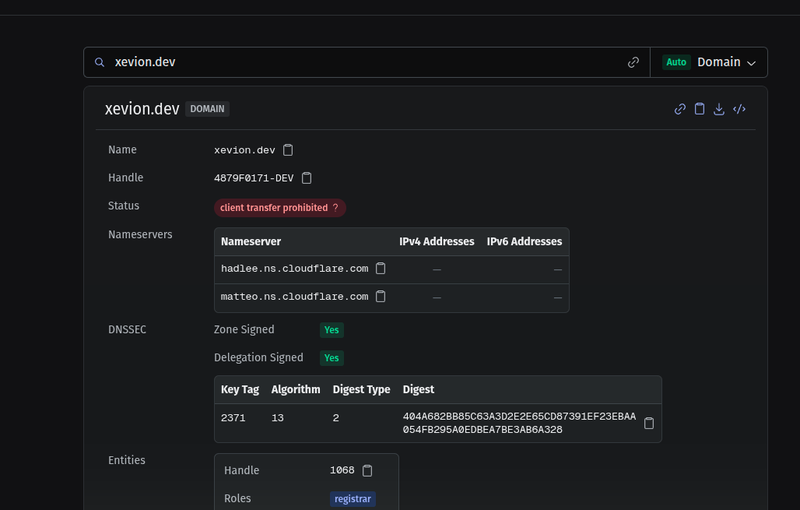
rdap is a browser-based client for RDAP, the structured-JSON successor to WHOIS. Enter a domain, IP address, ASN, or entity handle and it returns the registration data — owner, creation and expiry dates, status, contacts — parsed and laid out instead of dumped as plaintext. It is built with Next.js, React, and TypeScript, and runs entirely in the browser: there is no backend.
No backend
That last point is the interesting constraint. An RDAP lookup has to be routed: given example.com, something has to know which registry answers for .com and send the request there. The common shortcut is a public redirect service like rdap.org — you send it the query and it answers with an HTTP redirect to whichever registry is authoritative, doing the routing on its own server. rdap skips that hop and resolves the server in the browser.
When you submit a query, the page fetches the relevant IANA bootstrap file directly — dns.json for domains, ipv4.json and ipv6.json for addresses, asn.json for autonomous systems — works out which RDAP server is authoritative, and queries that server itself. No request touches a server I run, because there is not one.
Resolving the right server
Each bootstrap file is a table mapping sets of resources to the RDAP servers that answer for them, and matching a query against it is different for every object type:
Domains match by suffix:
example.co.ukis tested against every TLD entry until one is a suffix of it.IPv4 and IPv6 match by CIDR containment, parsing the address and checking it against each published range.
ASNs match by numeric range:
AS13335falls inside the block13312-18431.Entity handles match on their service-provider tag, the part after the final hyphen, so
OPS4-RIPEresolves through theRIPEtag.
All of that range and containment math runs client-side. When a registry lists several server URLs, rdap prefers the HTTPS one.
Guessing the type
You do not have to declare what you are querying. Paste 1.1.1.1, AS13335, example.com, OPS4-RIPE, a bare TLD like .dev, or a raw RDAP URL, and rdap works out the type on its own. Detection is an ordered chain of validators that runs most-specific first — URL, JSON, TLD, IPv4, IPv6, ASN, entity, then domain — because the looser patterns would otherwise swallow the stricter ones. A string of digits and dots such as 192.168 is rejected as a domain rather than guessed at. When detection guesses wrong, you can set the type by hand, and rdap warns you when the input does not match the type you picked.
Validation and contacts
Both the bootstrap files and the RDAP responses are validated with Zod before anything renders, so a registry that returns a malformed object produces a readable parse error instead of a blank panel. Contacts are the messiest corner of RDAP: registries return them as either vCard/jCard or the newer JSContact, and rdap normalizes both into one structure so names, organizations, emails, and addresses display the same way whichever format came back.
Tradeoffs
Running everything in the browser is the whole point, but it has one real cost: CORS. RDAP servers are not obliged to send the cross-origin headers a browser needs, and plenty do not. When one of them answers, the browser blocks the response before rdap can read it, and the query fails — not because the data is missing, but because the page is not allowed to see it. A small proxy would paper over the gap, but a proxy is a backend, and the absence of a backend is the design — so it stays a known limitation: most queries work, a few servers are simply unreachable from a browser tab.
Gallery